Key takeaways
- Remote assistance connects field workers with experts through live video, audio guidance, and on-screen annotations.
- Remote expert support helps technicians diagnose faults and resolve technical issues without waiting for an expert to reach the site.
- Industrial teams can use remote assistance for equipment maintenance, manufacturing, utilities, oil and gas, and field service operations.
- Low-bandwidth support, device compatibility, secure access, and session records are important when choosing remote assistance software.
- Telepresenz SmartOPS™ supports remote assistance with live video, hands-free audio, on-screen annotations, and timestamped evidence capture to help industrial teams guide field workers remotely.
Field technicians can encounter equipment faults that need specialist knowledge. The right expert may be at another plant, in a control room, or hundreds of kilometres away. Waiting for that person to reach the site can delay repairs and increase operating costs.
Remote assistance for field workers gives technicians a way to connect with experts who can assess a problem and guide the next steps from another location. Depending on the software, this may involve live video, audio guidance, visual annotations, and access to technical documents.
Industrial teams can use remote assistance during maintenance, equipment troubleshooting, inspections, commissioning, and other field tasks. The aim is to help workers get the guidance they need while keeping a record of the support provided.
This guide explains how remote assistance works, where industrial teams can use it, and what to evaluate before choosing a solution.
What is remote assistance for field workers?
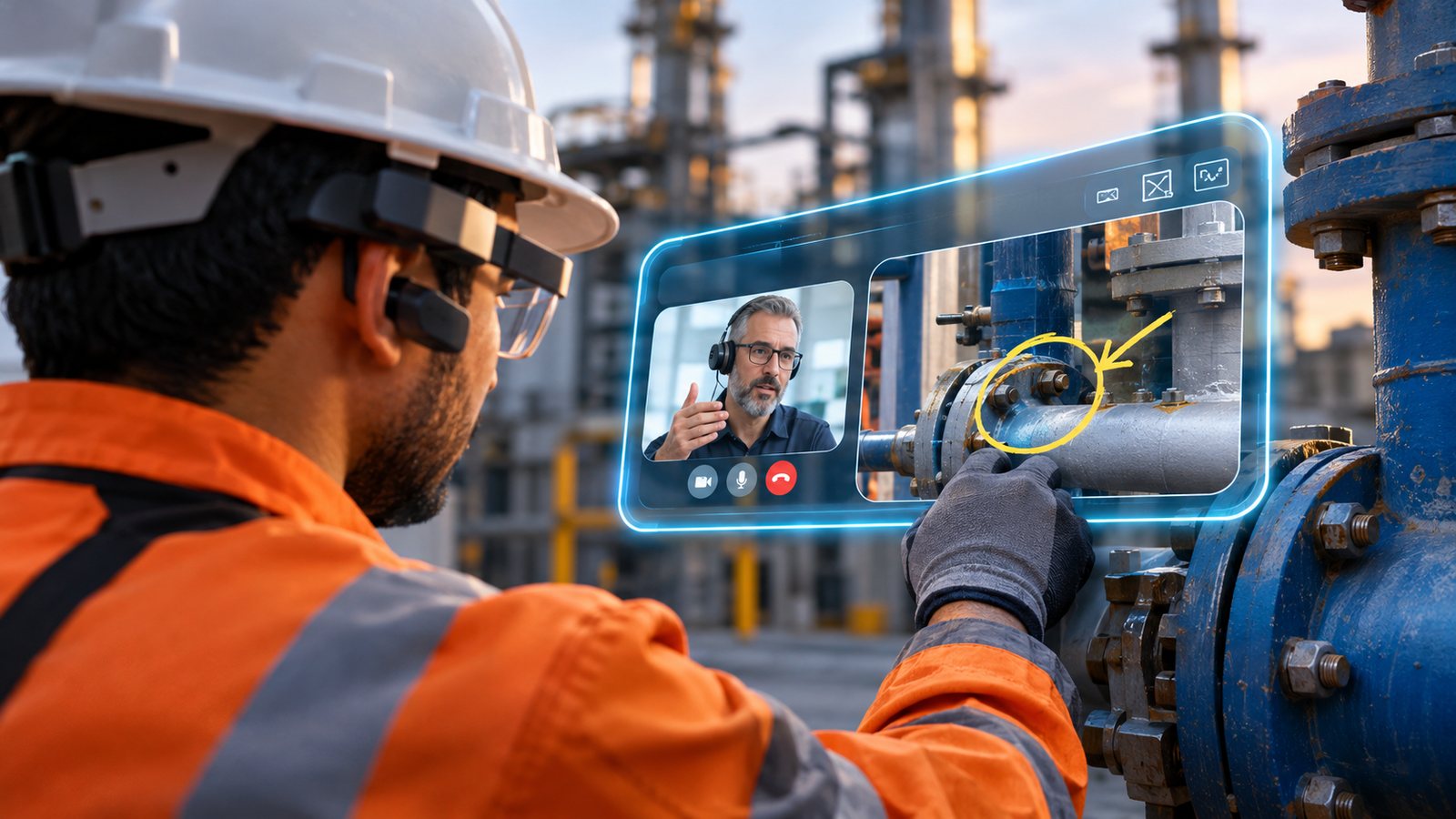
Remote assistance for field workers uses live visual communication software to link technicians on site with remote experts. Instead of describing a technical problem over a standard phone call or sending static pictures via instant messaging, the field worker shares live video from a mobile phone, tablet, or hands-free smart glasses.
The core technology relies on real-time spatial annotation and visual overlay capability. As the field technician moves around complex industrial assets, the off-site specialist views the exact working area, pinpoints damaged components, and draws visual instructions directly on the incoming screen feed. The technician sees these visual markers anchored over the physical equipment, making complex troubleshooting clear, precise, and step-by-step.
Remote visual assistance also helps field teams improve fault diagnosis and reduce repeat site visits. According to IBM’s guide to remote visual assistance, live video allows experts to examine equipment conditions remotely and guide technicians through repair steps. Some platforms also connect assistance sessions with maintenance systems, allowing teams to document service events and save annotated images for future training.
These capabilities help organisations retain technical knowledge and make it easier for field workers to access expert guidance when problems arise.
How remote assistance works in industrial operations
Industrial remote support software establishes a direct visual connection between field personnel and central support teams. The operational process moves through structured stages to ensure rapid resolution and accurate recordkeeping:
Issue identification
A field worker encounters a complex equipment error, an unexpected calibration failure, or an unfamiliar hardware configuration during scheduled maintenance.
Session initiation
The technician initiates a support request using remote support for field technicians. The system routes the call to available specialists based on required technical skill sets, plant location, or vendor certification levels.
Live visual collaboration
The specialist views the incoming camera stream from the central dashboard. Using remote expert assistance capabilities, the specialist places visual annotations on the live video stream to highlight specific valves, switches, circuit boards, or wiring connections.
Interactive troubleshooting
The remote expert guides the technician through complex diagnostics, sharing schematics, PDF manuals, or step-by-step digital overlays directly onto the technician’s screen.
Resolution and documentation
The field technician completes the guided repair. The system records the visual session, captures high-resolution evidence photos, and automatically attaches the complete communication record to the active enterprise work order.
Where industrial teams use remote assistance
Remote assistance can help in situations where a worker needs specialist knowledge, and the expert is located elsewhere. Its value depends on the task, available connectivity, safety requirements, and the information the expert needs to assess the problem.
Equipment troubleshooting and repair
A field technician may encounter a machine that will not start, a leaking component, or an unexpected equipment reading. Remote expert support lets a specialist inspect the visible condition and guide the next checks.
This can help the team decide whether the issue needs further testing, a planned repair, or an on-site specialist.
Maintenance support
Maintenance teams may need help with unfamiliar equipment or faults that require knowledge of a particular machine or process.
Remote assistance can connect the technician with an experienced engineer or equipment specialist. The expert can review the available information and guide the technician through approved maintenance steps.
The actual repair still depends on the fault, the worker’s qualifications, and the site’s safety procedures.
Field service operations
Service technicians working across several customer locations may encounter problems that exceed their available expertise.
Remote support for field technicians gives the service team another way to access specialist guidance without making every technical issue depend on an expert travelling to the site.
Remote assistance may also improve first-time fix rates. Geotab’s 2025 State of Field Service Report found that 75% of surveyed field service leaders reported an 11% to 30% improvement in first-time fix rates after adopting remote diagnostic and assistance technologies. For maintenance teams, this points to the value of giving technicians access to expert guidance while they inspect equipment and diagnose faults. Some problems may still require an on-site specialist.
Service organisations can also review the reasons for support requests to identify recurring problems and areas where technicians need additional training.
Manufacturing and production facilities
Manufacturing teams may need remote help when a production machine stops, a component behaves unexpectedly, or a process needs specialist review.
A shared visual view can help the remote expert understand what the technician is seeing. This may support faster assessment and reduce the need for repeated explanations.
Remote assistance can also help teams connect specialists across facilities when the relevant knowledge is held at another location.
Utilities and power distribution
Field crews working on electricity networks, water infrastructure, and other utility assets may operate far from their supervisors or technical specialists.
Remote assistance can give authorised experts a live view of a field situation and help them guide the next steps. The usefulness of this approach depends on network coverage, compatible devices, and the safety requirements of the task.
Oil and gas operations
Oil and gas teams may need specialist guidance at remote production sites, processing facilities, and equipment installations.
Remote assistance can help an expert assess a visible problem and guide an authorised technician through the relevant checks. Device suitability, site access rules, hazardous-area requirements, and network availability need to be assessed before deployment.
Remote support does not remove the need for site-specific risk assessments or established operating procedures.
How Telepresenz helped utility linemen resolve faults faster
During a utility deployment, Telepresenz used SmartOPS™ to connect field linemen with remote experts during outage response. This allowed specialists to guide workers through fault diagnosis without needing to travel to the site for every issue.
The deployment delivered measurable results:
These results show how remote assistance can help utility teams speed up fault resolution, restore services sooner, and reduce repeat field visits.
Read the Telepresenz utility remote assistance case study.
These results belong to that specific deployment and should not be treated as guaranteed outcomes for other organisations.
Remote assistance vs. standard video calls
Standard consumer video applications allow two people to talk, but they lack essential features required for industrial field support.
| Capabilities and features | Standard video calls | Industrial remote support software |
|---|---|---|
| Visual annotations | Basic screen drawing on flat background | 3D visual markers anchored directly to physical machine components |
| Bandwidth management | Requires strong high-speed internet | Operates reliably over low-bandwidth, high-latency, or 2G/3G connections |
| Hands-free integration | Handheld mobile phones and laptops only | Native support for industrial smart glasses, thermal cameras, and headsets |
| Workplace security | Standard end-to-end call encryption | Enterprise security, role-based access, SSO, and SOC2 compliance |
| Operational records | Manual video downloading and local saving | Automated session logging, photo capture, and direct integration with FSM/CMMS |
| Data overlay capabilities | None | Real-time sharing of technical manuals, schematics, and IoT telemetry |
What to look for in remote assistance software
When evaluating software for remote assistance, industrial operations leaders should assess connectivity, security, device support, and integration with existing systems. These factors affect how well the software fits field conditions and daily maintenance work.
Research supports the growing role of remote support in industrial service operations. A 2024 report by PMMI and Interact Analysis found that 55% of surveyed end users were already using remote support, while another 37% planned to adopt it by 2027. The report also identifies cybersecurity and integration barriers that organisations need to consider when adopting remote services.
Low-bandwidth stability
Field locations often have weak or fluctuating cellular connections. Industrial software dynamically adjusts video resolution, frame rates, and audio compression to maintain connection stability without dropping calls.
Hands-free wearable support
Technicians frequently need both hands free to hold tools, adjust valves, or work on live electrical panels safely while viewing expert instructions on smart glasses.
Security and enterprise compliance
Remote assistance sessions involve sensitive proprietary equipment and internal network infrastructure. Support platforms must feature enterprise encryption, multi-factor authentication, single sign-on (SSO), and role-based permissions.
System integration
The software should connect directly with existing Field Service Management (FSM), Enterprise Resource Planning (ERP), and Computerized Maintenance Management Systems (CMMS) to keep asset histories up to date.
Multi-party collaboration
Complex equipment issues may require input from multiple vendors or engineering departments simultaneously. The platform should support multi-user conference calls with shared annotation capabilities.
How remote assistance fits into maintenance workflows
Remote assistance works alongside regular preventative maintenance programs and emergency dispatch protocols. Integrating live support into standard work order systems improves operational efficiency at every stage.
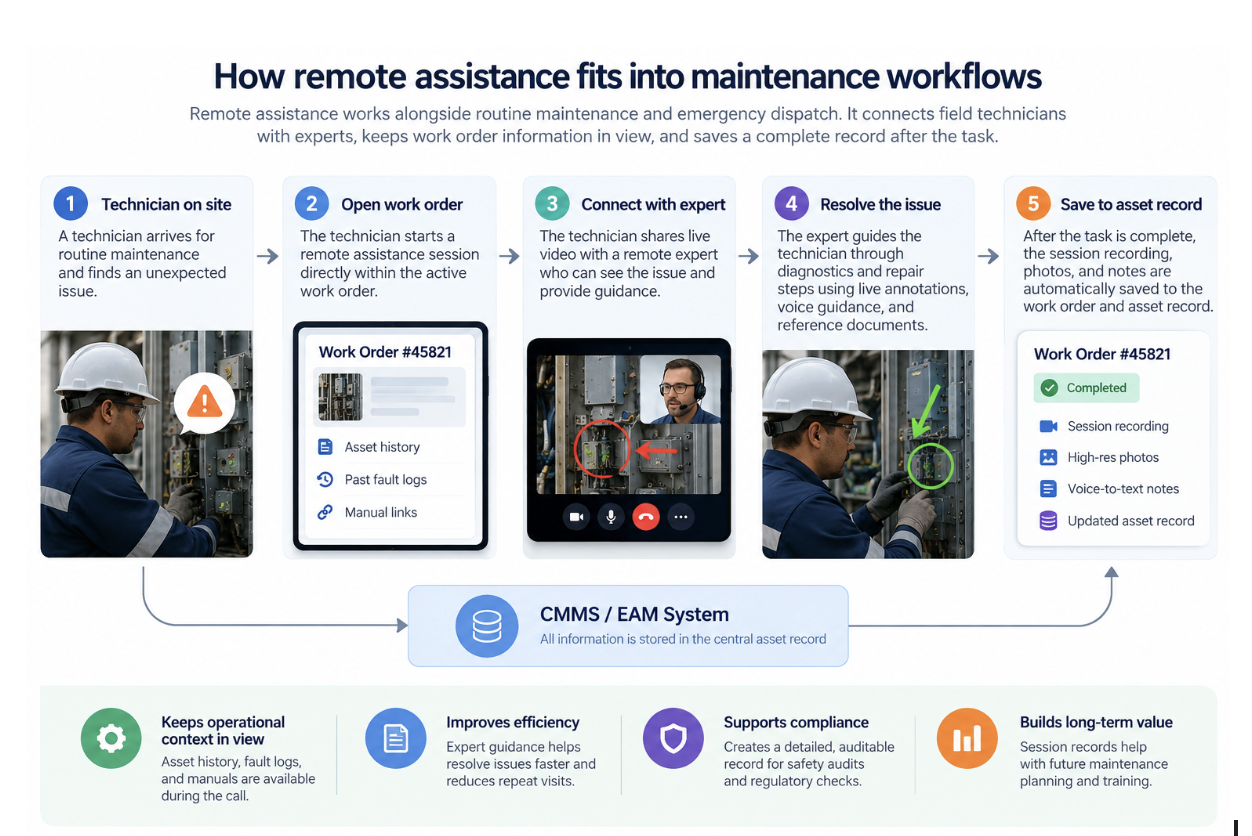
How Telepresenz SmartOPS™ supports remote assistance
Telepresenz SmartOPS™ provides remote assistance capabilities for industrial field operations. Its remote assistance solution connects field workers with remote experts through live visual collaboration.
Documented capabilities include:
- Live video sessions that let experts view the field worker’s situation.
- Audio guidance to support communication during field tasks.
- On-screen annotations that help experts identify components or areas of interest.
- Capture of session evidence, including relevant images, annotations, and messages.
- Support for field workflows and session records.
- Connectivity features designed for remote operations, with behaviour depending on the deployment and available network.
These capabilities can help industrial teams give technicians access to specialist guidance and retain records of the support provided.
Telepresenz also documents remote assistance deployments in utilities, mining, manufacturing, and other industrial environments.
For organisations evaluating solutions, the next step is to determine how the platform fits their devices, connectivity, safety procedures, and existing operational systems.
See in action: Remote Assistance for Industrial Field Teams
FAQ
Field technicians can use existing iOS or Android smartphones and tablets. For hands-free work in hazardous environments, the software runs natively on industrial smart glasses and wearable headsets.
Yes. Purpose-built industrial software uses dynamic bandwidth management to maintain clear audio and visual communication over low-bandwidth, high-latency, or unstable cellular networks.
Remote experts can review live environmental hazards and lockout/tagout procedures before field technicians touch high-voltage or pressurised equipment. Hands-free smart glasses also keep workers’ hands free to manage physical tools safely.
Recorded remote support sessions serve as a library of real-world troubleshooting examples. New technicians can review past video logs to learn how senior experts solved complex equipment failures.
Telepresenz SmartOPS™. Technicians start a low-bandwidth video session straight from an active work order. A remote expert adds live AR annotations over the machine, on a smartphone, tablet, or smart glasses. When the job ends, the platform attaches timestamped video and photos to the asset history.
Written by

Indu Tolia
Founder and CEO of Telepresenz
She leads the company’s work to help industrial organizations make frontline work safer, more connected, and more efficient through technology.
Connect with Indu Tolia on LinkedIn