Key takeaways
- Digital work instructions software gives frontline workers step-by-step, visual guidance directly where work happens, helping standardize execution and reduce errors.
- Digital work instructions help capture tribal knowledge from experienced workers and turn it into repeatable processes that operators, technicians, and new employees can follow.
- The strongest solutions combine work instructions with checklists, workflows, images and video, data capture, approvals, and other operational tools, instead of treating instructions as standalone documents.
- When critical procedures and tribal knowledge are searchable and available at the point of work, organizations can reduce dependence on individual experts and speed up worker training.
- Industrial teams should evaluate capabilities like mobile and offline access, multimedia guidance, version control, knowledge capture, integrations, analytics, workflow support, and scalability across sites and frontline teams.
Industrial teams rely on clear instructions to perform maintenance, inspections, assembly, troubleshooting, safety procedures, and other frontline tasks consistently. When those instructions live in paper manuals, PDFs, spreadsheets, or the experience of a few senior workers, getting the correct information to a worker on the job can be difficult.
This need is growing as industrial work becomes more technology-driven. The World Economic Forum estimates that one in two manufacturing workers could need some form of upskilling or training in the coming years. That points to a growing need to make operational knowledge easier to access and apply on the job.
Digital work instructions software helps industrial teams replace static paper manuals and inconsistent instructions with guided, digital steps that workers can open while doing the task. These platforms help standardize work, improve task execution, capture frontline knowledge, and make critical expertise easier to reach across distributed operations.
Depending on the platform, instructions can include step-by-step guidance, images, videos, checklists, approvals, evidence capture, knowledge resources, and other information needed to complete a task.
The larger opportunity is to connect operational knowledge with frontline execution.
For industrial organizations, that can mean more consistent work, faster onboarding, easier knowledge transfer, better access to expertise, and greater visibility into how work is actually performed.
What is digital work instructions software?
Digital work instructions software is a platform used to create, manage, deliver, and maintain step-by-step instructions for frontline tasks.
Instead of asking workers to search through a manual or rely on someone else’s experience, the software provides structured guidance at the point of work.
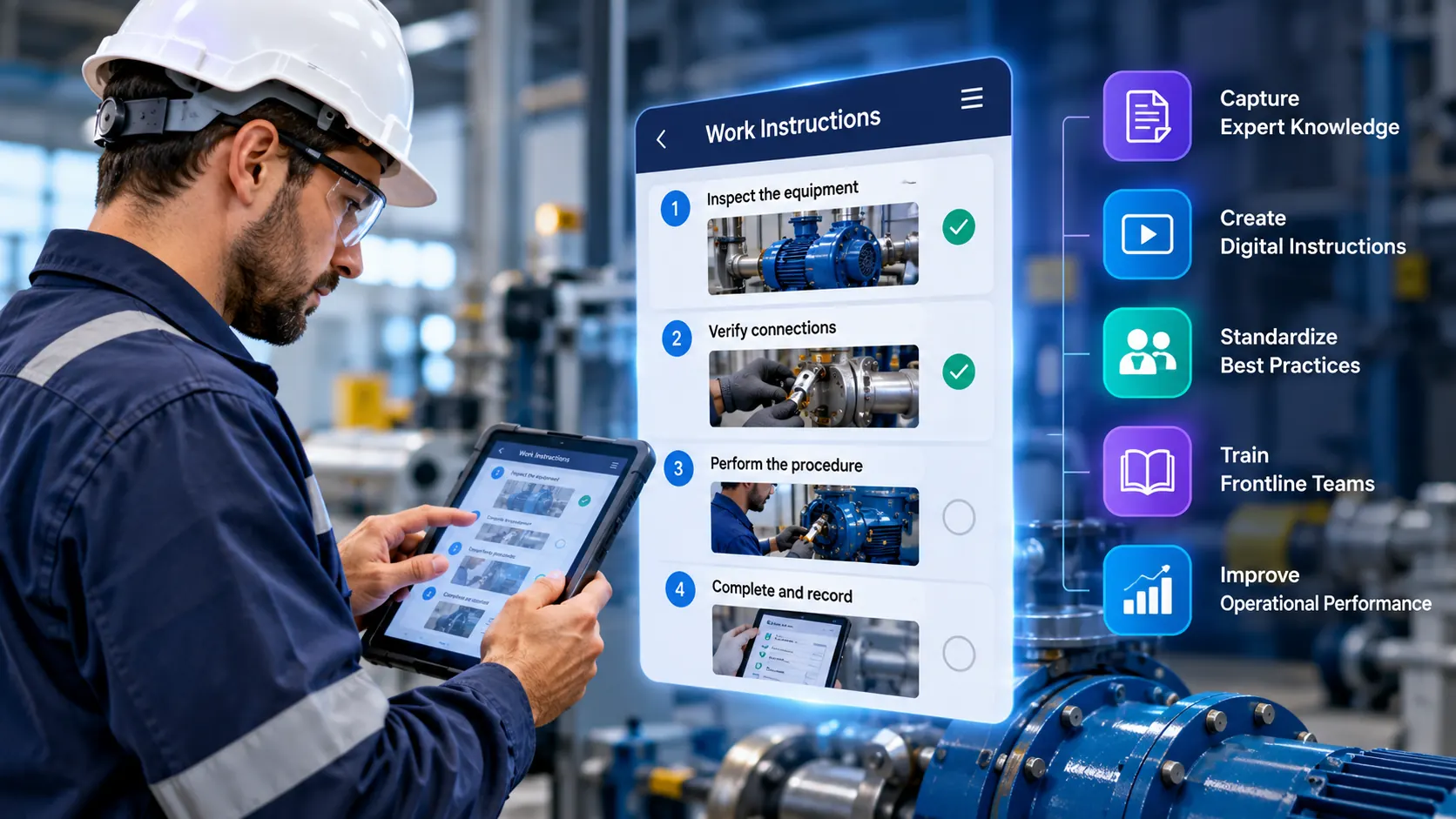
A maintenance technician servicing a pump could access:
- The correct procedure for that equipment
- Step-by-step instructions
- Images or videos demonstrating the task
- Safety requirements
- Inspection or verification steps
- Troubleshooting guidance
- A way to record observations or evidence
This makes digital work instructions different from simply storing PDFs in a digital repository.
A document repository answers where the information is. Digital work instructions answer what to do and how to do it correctly.
Modern platforms increasingly combine instructions with data capture, workflow logic, multimedia, search, integrations, and knowledge management.
Digital work instructions vs. traditional SOPs
Digital work instructions and standard operating procedures (SOPs) are related. They differ in how much detail they give.
An SOP defines the required process or standard: what needs to happen, who is responsible, and what requirements must be followed.
A work instruction gives more detailed guidance on how a specific task should be performed.
Take preventive maintenance on a pump.
Standard operating procedure (SOP)
Perform preventive maintenance on the pump according to the approved maintenance procedure.
Digital work instruction
- Isolate the pump.
- Verify the isolation status.
- Remove the inspection cover.
- Check the specified components.
- Capture the required measurements.
- Record the result.
- Complete the final verification.
The distinction matters because digitizing an SOP as a PDF does not necessarily improve execution. A useful digital work instruction connects the documented standard to the worker performing the task.
How digital work instructions work
A practical digital work instruction system can be thought of as a five-stage cycle.
Create
Organizations convert existing procedures, expert knowledge, manuals, videos, and operational experience into structured instructions.
Digitize
Teams add images, video, annotations, checklists, and step-by-step guidance. They also organize instructions by task, asset, role, or location so workers can find them.
Guide
Workers follow the instructions step by step while performing the task.
Capture
The system can capture information generated during execution, like confirmations, observations, images, videos, measurements, or feedback.
Improve
Organizations use frontline feedback and operational experience to update instructions and improve how work is performed.
This creates a continuous loop:
Knowledge → Instruction → Execution → Feedback → Better Knowledge
That is a much more useful model than treating work instructions as documents that are written once and rarely revisited.
Why industrial teams are moving beyond paper and PDFs
Paper instructions have an obvious limitation: they can become outdated as soon as a process changes.
PDFs solve the distribution problem to some extent. They can still leave workers responsible for finding the correct document and turning it into action.
Digital work instructions can provide a more structured execution experience through multimedia, controlled updates, interactive steps, data capture, and integrations with operational systems.
The bigger issue is knowledge fragmentation. A critical maintenance technique may live only in an experienced technician’s memory, and a useful workaround may never reach the official procedure.
A Deloitte Insights article notes that 92% of surveyed organizations fail to consistently capture knowledge from soon-to-be retirees, citing an APQC study, even as 85% of C-suite leaders view the knowledge exodus as a moderate-to-mission-critical threat.
When experienced employees leave, that knowledge can leave with them.
This is why modern work instruction software is increasingly connected to knowledge capture and frontline knowledge management, not just documentation. The goal is to turn valuable operational knowledge into something the people doing the work can access, update, and reuse.
How digital work instructions help capture tribal knowledge
Industrial organizations hold two kinds of knowledge:
Documented knowledge
What the organization has formally written down.
Experience-based knowledge
What experienced workers know because they have performed the work many times.
The second category can be difficult to capture.
An experienced technician may know how a machine sounds before it fails or which inspection point needs extra attention. That knowledge may never appear in an official manual.
Digital platforms can help organizations capture tribal knowledge from workers by turning practical experience into reusable content.
An experienced technician can demonstrate a task on video or explain a troubleshooting procedure. That information can then be shaped into a digital guide, training resource, or searchable knowledge asset.
The objective is to make experienced workers’ expertise transferable and reusable.
This is particularly important as industrial organizations deal with workforce turnover, retirements, and distributed teams. Work-instruction platforms increasingly position knowledge capture as a core part of the category.
Digital work instructions and field worker knowledge management
For distributed industrial teams, knowledge management has a second need: access.
A field worker needs to find the right information during the task.
This is where digital work instructions can become part of a broader field worker knowledge management strategy.
Instead of keeping knowledge in separate manuals, training systems, shared drives, and individual employees’ memories, organizations can connect operational knowledge to the work itself.
Digital work instructions can do more than store procedures. They can help organizations move frontline knowledge through a cycle:
Capture → Organize → Share → Apply → Preserve
That turns the platform into a working knowledge system.
A technician arriving at a piece of equipment could access the procedures, guides, training content, or troubleshooting information for that asset.
The knowledge is available where the work happens, so the worker does not need to leave the task and search elsewhere.
Digital work instructions for manufacturing, maintenance, inspections, utilities, oil and gas, and transportation can be especially valuable where workers operate away from a traditional office.
Key features to look for in digital work instructions software
Not every digital work instructions platform provides the same capabilities. Industrial organizations should evaluate software based on how well it supports both knowledge management and actual frontline execution.
Step-by-step guidance
Workers should be able to follow clear, structured instructions without reading through large blocks of documentation.
Visual content
Images, videos, diagrams, annotations, and other visual elements can make complex procedures easier to understand.
Knowledge capture
The platform should provide practical ways to capture expertise from experienced workers and turn it into reusable knowledge.
Searchable knowledge
Workers should be able to find the right procedure or piece of information without navigating large collections of documents.
Version control
Instructions need to stay current as procedures, equipment, safety requirements, and processes change.
Mobile and field access
Frontline workers should be able to open relevant information on the devices they actually use in the field.
Offline capability
For remote industrial environments with unreliable connectivity, offline access can be an important consideration.
Evidence capture
For certain workflows, workers may need to record photos, videos, observations, measurements, or completion evidence.
Integration
The software should fit into the existing operational environment without creating another isolated information system.
Analytics and feedback
Managers should be able to see how knowledge is being used, where workers run into difficulties, and where training or content gaps exist.
These capabilities are consistent with common buyer considerations for work-instruction platforms.
Digital work instructions vs. paper and PDFs
| Capability | Paper | Digital work instructions | |
|---|---|---|---|
| Step-by-step guidance | Limited | Limited | Yes |
| Visual content | Limited | Yes | Yes |
| Centralized updates | No | Possible | Yes |
| Version control | Difficult | Limited | Yes |
| Interactive workflows | No | Limited | Yes |
| Knowledge capture | No | Limited | Yes |
| Frontline feedback | No | Limited | Yes |
| Evidence capture | Manual | Limited | Yes |
| Searchable knowledge | No | Basic | Yes |
| Field access | Physical copy | Device-dependent | Mobile/field-oriented |
| Operational integration | No | Limited | Platform-dependent |
The key distinction is not simply paper versus digital.
It is information versus execution.
A digital document can make information easier to access. A well-designed digital work instruction system goes further by helping workers apply that information during the task.
Benefits of digital work instructions software
When implemented around real operational needs, digital work instructions for industrial teams can support several business outcomes.
Standardize frontline execution
Frontline digital work instructions give workers across shifts, sites, and experience levels access to the same approved procedures.
Accelerate onboarding
New employees can receive structured, multimedia guidance instead of depending entirely on shadowing and informal knowledge transfer. McKinsey notes that digital tools can support timely, on-the-job capability building and help employees learn faster by bringing training closer to the work itself.
Preserve institutional knowledge
Organizations can capture expertise before it disappears when experienced employees retire or move on.
Reduce dependence on individual experts
Workers can access documented guidance and knowledge without needing to find a senior colleague every time.
Improve knowledge accessibility
Relevant information can be connected to tasks, assets, locations, and roles.
Support continuous improvement
Feedback from frontline execution can reveal where instructions need to be clarified or updated.
Reduce errors
Clear guidance during the task helps workers avoid missed steps and repeat mistakes.
Improve first-time execution
Workers get the information they need at the point of work.
Support distributed teams
Standardized knowledge is available across sites.
Improve operational visibility
Information captured during execution gives managers a clearer view of how work is done.
The strongest results come when teams treat digital work instructions as part of the operating process.
How to choose digital work instructions software
The right platform depends on the organization’s operational environment, existing systems, workforce, and knowledge-management requirements. There is no single digital work instruction software that is automatically the best choice for every industrial company. Buyer guidance increasingly recommends evaluating platforms against actual processes instead of relying only on feature lists or demonstrations.
Before selecting a platform, ask:
Knowledge capture
Can our experts easily capture and share their knowledge?
Point-of-work access
Do workers get instructions where the work happens?
Contextual instructions
Are instructions linked to assets, locations, or workflows?
Content governance
Can content be updated and controlled centrally?
Remote and offline work
Does the system support remote or offline workers?
Evidence and feedback
Is evidence and feedback captured during execution?
System integration
Will the platform integrate with our existing operational systems?
Measurement
How will we measure training, knowledge gaps, and adoption?
Scalability
Does it scale across multiple sites?
Real operational value
Does it solve an actual frontline problem, or does it only digitize existing documents?
The last question is particularly important.
A company can spend significant time digitizing hundreds of documents and still fail to improve frontline execution if workers cannot easily find, understand, or apply those instructions.
How SmartITM™ supports digital work instructions
For organizations looking to connect digital work instructions, knowledge capture, and frontline training, Telepresenz offers SmartITM™.
SmartITM™ is designed to capture expert knowledge and turn it into digital work instructions, SOPs, and training content. The platform provides a searchable knowledge environment where frontline teams can access relevant information and training content from the field.
Digital work instructions software is the category. SmartITM™ is Telepresenz’s product for applying that approach to frontline knowledge, training, and operational execution.
SmartITM can support field worker knowledge management inside a broader operational environment, where organizations need to capture tribal knowledge from workers, deliver it to frontline teams, and keep building workforce capability.
For organizations evaluating digital work instructions software, the relevant question is whether a platform can help turn organizational knowledge into something workers can find, understand, apply, and improve.
Telepresenz offers SmartITM™ across oil and gas, energy and utilities, mining, manufacturing, aviation, and other industrial environments, helping organizations capture expert knowledge and turn it into digital work instructions, SOPs, and training content that frontline teams can access when and where they need it. Explore Telepresenz services.
See SmartITM™ in action
Watch this video to learn more about how Telepresenz SmartITM™ supports knowledge capture and training for industrial teams.
Turn expert knowledge into frontline capability
See how SmartITM™ can help your teams capture knowledge, standardize work, and train faster.
FAQs
Written by

Indu Tolia
Founder and CEO of Telepresenz
She leads the company’s work to help industrial organizations make frontline work safer, more connected, and more efficient through technology.
Connect with Indu Tolia on LinkedIn

