Key takeaways
- AI computer vision for safety analyzes visual data to spot safety risks in industrial environments.
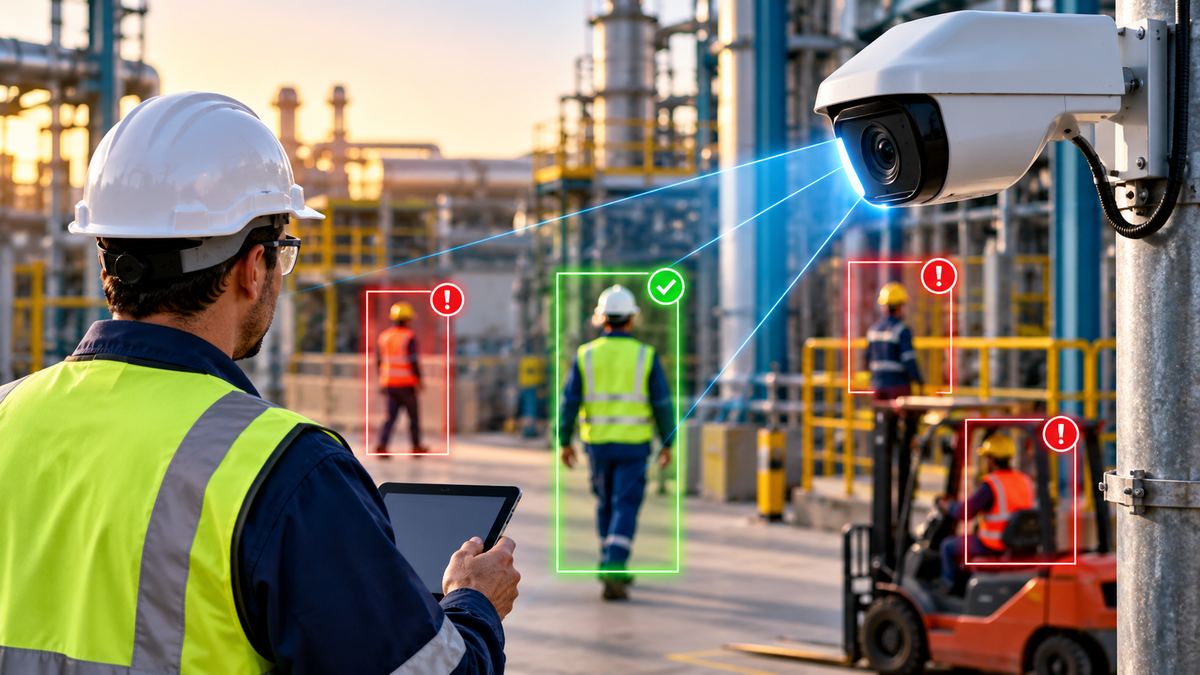
- AI-powered cameras can detect PPE violations, unsafe behaviors, restricted-area entry, and other visible hazards.
- Real-time detection can help safety teams identify potential risks before they become incidents.
- Computer vision supports human safety teams by adding continuous monitoring of configured conditions across industrial worksites.
- Telepresenz SmartEYE™ brings AI-powered safety monitoring into frontline industrial operations.
Industrial safety teams are expected to spot risks before they become incidents. On a busy plant floor, construction site, or energy facility, watching every worker, task, and hazard at all times is difficult.
This is where computer vision safety technology can add another layer of visibility to an AI-powered industrial safety program.
Computer vision uses artificial intelligence to analyze images and video and spot predefined visual conditions, like PPE non-compliance, unsafe behavior, restricted-zone access, or other potential hazards. Deloitte’s 2025 Smart Manufacturing and Operations Survey found that 28% of large manufacturers ranked vision systems among their top two technology investment priorities for the next 24 months.
Computer vision can turn visual information into actionable safety intelligence. It helps safety teams find relevant conditions faster, respond to potential risks, and keep a more continuous view of what is happening across industrial environments.
What is computer vision in industrial safety?
Computer vision in industrial safety is the use of AI to analyze images or video and spot predefined safety conditions, hazards, or compliance violations.
Industrial computer vision uses this technology on plants, sites, and facilities, where the safety team defines the conditions to watch for.
Traditional cameras mainly provide visibility. A person has to watch the footage or review recordings to decide whether something needs attention. Computer vision adds an interpretation layer. An AI system can analyze visual information for specific conditions set up for the environment, so a person does not need to watch every feed at all times.
The National Institute for Occupational Safety and Health (NIOSH) describes computer vision applications that include monitoring safety compliance, tracking workers in particular areas, and examining workplace safety conditions.
A simple way to think about it:
Camera or visual source
Images or video are captured from cameras or other supported visual sources.
AI analysis
Computer vision models analyze the visual information for configured conditions.
Safety condition detected
The system identifies a possible safety event, such as missing PPE or restricted-zone entry.
Alert or notification
A configured alert can bring the event to the attention of the relevant team.
Human response
Safety professionals review the event and decide on the appropriate response.
A camera may capture workers entering a designated area. Computer vision can analyze the footage and check whether a person appears to be wearing required PPE or whether someone has entered a configured restricted zone.
This changes the role of video. It can be more than a record of what happened. It can become a source of real-time safety information.
Computer vision works as an additional layer of observation. It can help safety teams monitor predefined conditions at greater scale, but it does not replace safety professionals or the controls that remove hazards.
NIOSH’s hierarchy of controls ranks elimination, substitution, and engineering controls above administrative controls and PPE because they can reduce exposure without depending primarily on worker behavior. US employers reported approximately 2.5 million nonfatal workplace injuries and illnesses in 2024, while 5,070 workers died from work injuries, according to the Bureau of Labor Statistics.
How does AI detect safety risks with computer vision?
AI hazard detection can be configured for different visual safety conditions, depending on the environment, available visual data, and the organization’s requirements. Workplace hazard detection works best when each condition is defined up front.
Visual data is captured
The system receives images or video from cameras or other visual sources. Depending on the application, this could include fixed CCTV or IP cameras, bodycams, drones, or other connected devices. A camera that cannot see the relevant area can limit what an AI system reliably identifies.
AI analyzes the visual information
Computer vision models process the images or video to find relevant objects, people, movements, locations, and visual patterns. The system looks for specific conditions it has been set up or trained to recognize.
Safety conditions are evaluated
The detected information is compared against defined safety requirements. Checks may cover required PPE, restricted-area entry, a person inside a defined safety zone, visible unsafe conditions, or a situation that matches a configured safety rule.
Potential risks are flagged
When the system finds a condition that meets the set criteria, it can generate an alert or event. This helps safety teams focus on events that need a closer look instead of reviewing all video by hand.
Teams respond
Detection is only the first step. The useful outcome is a link between detection and the right response, such as notifying a supervisor, reviewing an event, documenting it, starting corrective action, or identifying repeat safety patterns.
Detect → Alert → Review → Respond → Record → Improve
That is where computer vision moves beyond surveillance and becomes part of an organization’s broader safety management approach.
What industrial safety risks can computer vision detect?
Computer vision can be configured for different visual safety conditions depending on the environment, available visual data, and the specific requirements of the organization.
PPE non-compliance
Identifies visual indicators of missing or incorrectly worn required personal protective equipment.
Restricted-zone access
Flags people entering designated areas where access is restricted or controlled.
Unsafe behavior
Looks for specific predefined behaviors associated with operational risk.
Unsafe proximity
Monitors configured proximity zones around people, vehicles, or equipment.
Fire and smoke
Identifies visible indicators of fire or smoke where the system supports these detection capabilities.
Housekeeping conditions
Flags certain visible obstructions or potentially unsafe conditions in work areas.
Equipment-related risks
Looks for specific visual conditions around machinery or equipment.
Work-area conditions
Monitors configured visual indicators of potentially unsafe environments.
Computer vision cannot detect every possible industrial hazard. Detection depends on camera position, lighting, distance, environmental conditions, visibility, model performance, and the condition being monitored.
How computer vision improves PPE compliance
OSHA describes PPE as equipment used to minimize exposure to hazards that can cause serious workplace injuries or illnesses. Keeping PPE compliance steady across workers, shifts, locations, contractors, and changing operating conditions can be difficult for industrial organizations.
Manual PPE monitoring is often periodic. A supervisor may walk the site, observe a work area, or review an inspection. Conditions can change between those observations.
Computer vision PPE detection can add more continuous monitoring by analyzing visual feeds for configured PPE requirements. Depending on the system, this may include helmets, high-visibility vests, gloves, or other detectable PPE.
Traditional PPE monitoring
Relies on inspections, supervisor observations, and manual footage review at particular times.
AI-assisted PPE monitoring
Analyzes visual feeds for configured PPE requirements and can flag potential non-compliance for review.
Computer vision does not replace a PPE program or broader hazard controls. OSHA’s hierarchy of controls places PPE below elimination, substitution, engineering controls, and administrative or work-practice controls. PPE remains one part of a wider safety strategy.
Where is computer vision used in industrial safety?
Computer vision for industrial environments can be adapted to different sites because many safety risks have a visible component.
Manufacturing
Computer vision for manufacturing safety can monitor PPE compliance, restricted areas, equipment interactions, work zones, and other predefined visual conditions on production floors.
Oil and gas
Computer vision for oil and gas safety can support monitoring of PPE, restricted zones, unsafe conditions, and other predefined visual risks across facilities and work areas.
Construction
Changing work zones, moving equipment, and shifting site conditions make construction a potential application for visual monitoring of PPE, exclusion zones, and equipment interactions.
Energy and utilities
AI-powered visual monitoring can help teams spot configured safety conditions and give supervisors greater visibility into remote work areas.
Mining
Computer vision can provide an additional monitoring layer for defined safety conditions in environments involving large equipment, remote work areas, and close interactions between workers and machinery.
The common principle across these applications is the same: use AI to observe the visual conditions that matter to safety teams and surface relevant events for human action.
Why are industrial teams using AI for safety monitoring?
Traditional safety monitoring remains essential, but it has practical limitations when organizations operate across multiple sites or need to monitor changing conditions continuously. AI-assisted, real-time safety monitoring can add several capabilities.
Continuous visual analysis
Analyzes configured visual conditions across supported camera feeds instead of relying only on periodic observation.
Automated detection
Can surface potential safety events without requiring someone to watch every video feed continuously.
Faster event visibility
Potential issues can be flagged as they occur, subject to system configuration and alert delivery.
Focused video review
AI can help safety teams identify relevant events to review rather than manually searching all footage.
Multi-site monitoring
Multiple supported visual sources can be analyzed to extend visibility across work areas.
Digital safety records
Depending on the platform, events can contribute to safety records, reporting, and analytics.
The important point is not that AI is inherently better than human judgment. Human expertise remains critical for understanding the situation, assessing risk, choosing the right action, and improving safety programs.
AI can help answer a different question: what is happening right now that may need our attention?
This can be valuable when safety teams oversee multiple locations, large facilities, or environments where continuous physical observation is impractical.
What are the limitations of computer vision for safety?
Computer vision workplace safety systems have limits, and a reliable industrial setup accounts for them.
Camera positioning
If the relevant work area cannot be seen clearly, the system cannot reliably analyze what is happening. Camera placement should be designed around the specific safety use case.
Lighting conditions
Changing light, glare, shadows, darkness, and other environmental factors can affect what a camera captures and what an AI model can identify.
Obstructed views
Workers, equipment, structures, or other objects can temporarily block the camera’s view.
Distance and image quality
Objects or PPE that look sharp at one distance may be harder to identify at another.
False positives and missed events
Computer vision systems can flag conditions incorrectly or miss events. Safety teams should review alerts before treating them as confirmed violations.
Human oversight
AI can identify and surface potential events. Safety professionals understand the context and decide the appropriate response.
Privacy and governance
Organizations should define who can access footage, how long it is retained, and how workers are informed about monitoring.
Connectivity and maintenance
Remote sites with weak networks may delay alerts. Detection rules and models may also need tuning as sites, equipment, and conditions change.
NIOSH also cautions that bringing AI into workplaces can create new risks, so responsible implementation and risk management matter. The goal is to support safety teams with automation where it helps, not to remove human judgment from safety decisions.
From safety detection to action
The real value of computer vision comes after the system spots a person without PPE or flags an event on camera. What happens next matters most.
A useful industrial safety system connects detection with action.
Visual data
Camera feeds or other supported visual sources provide the information.
AI detection
The system analyzes the footage for configured safety conditions.
Alert
A potential event is surfaced to the appropriate team.
Safety review
A responsible person reviews the event and determines whether action is needed.
Corrective action
The team takes the appropriate steps to address the confirmed issue.
Documentation and analysis
Events can be documented and reviewed to identify patterns and opportunities to improve safety processes.
This is where Telepresenz SmartEYE™ fits.
SmartEYE™ is an AI-powered computer vision safety platform designed to monitor industrial environments in real time. It can analyze visual information for safety risks, PPE violations, unsafe conditions, restricted-zone access, fire and smoke, and other configured safety events. It can then trigger alerts and support incident tracking, reporting, and safety analytics.
SmartEYE™ can work with existing visual infrastructure, including IP cameras and CCTV, as well as bodycams and drones. Organizations can build computer vision monitoring around their existing environment instead of treating cameras as a completely separate system.
For industrial teams, that shifts visual information from a record of what happened to a tool for finding and responding to what may need attention.
How to implement computer vision safety in an industrial environment
Successful computer vision safety programs should start with the safety problem. Technology choices follow.
Identify the risks worth monitoring
Start by finding the safety conditions where extra visual monitoring could add real value.
Define what the system should detect
Avoid monitoring everything at once. Start with clearly defined conditions like PPE compliance, restricted-zone entry, or specific hazards for the environment.
Evaluate camera coverage
Check whether existing cameras give the visibility the selected use cases need. If they do not, more visual sources may be required.
Define the response
Decide what should happen when an event is detected. Establish who receives the alert, who investigates it, what counts as a confirmed event, and what corrective action follows.
Measure and improve
Track repeat events, response patterns, detection performance, and areas where safety procedures may need improvement.
This turns computer vision from a technology rollout into an ongoing safety improvement process.
Turn industrial video into actionable safety intelligence
Industrial teams cannot manually watch every work area at all times. Computer vision adds an intelligent monitoring layer that can help safety teams spot predefined risks, improve visibility, and respond to relevant events faster.
See how SmartEYE™ can bring AI-powered computer vision safety monitoring to your industrial environment.
FAQs
Computer vision analyzes visual data to identify predefined safety conditions, such as PPE violations, restricted-zone access, and other hazards, helping safety teams review potential risks and respond faster.
Depending on the system and environment, AI can detect visual conditions such as PPE non-compliance, unsafe behavior, restricted-zone access, fire or smoke, and other configured hazards.
Yes. Computer vision systems can analyze camera feeds for configured PPE requirements and flag potential non-compliance for safety teams to review and address.
Telepresenz SmartEYE™ supports visual inputs from CCTV, IP cameras, bodycams, drones, and phone cameras. It uses AI-powered computer vision to monitor industrial environments, detect configured safety risks, and generate alerts.
Telepresenz SmartEYE™ provides AI-powered safety monitoring for industrial environments. It helps safety teams monitor configured risks, receive alerts, and manage safety events across distributed operations.
Written by

Indu Tolia
Founder and CEO of Telepresenz
She leads the company’s work to help industrial organizations make frontline work safer, more connected, and more efficient through technology.
Connect with Indu Tolia on LinkedIn